
Logitech Ergo M575S Review: The Trackball That Saved My Wrist
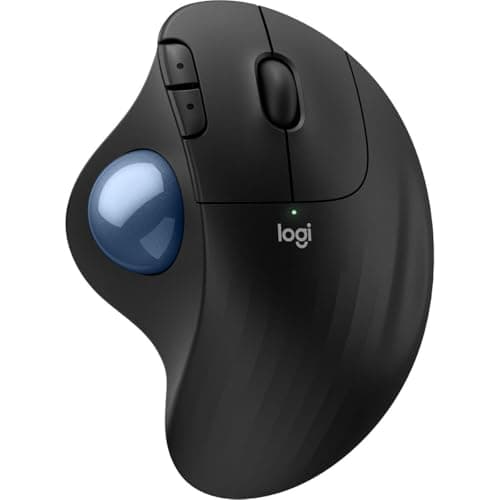
Logitech Ergo M575S Wireless Ergonomic Trackball Mouse, Black/Blue (910-007026)
Logitech
- Work it your way: Experience enhanced control with 3 customizable buttons, time-saving shortcuts, and Smart Actions
- Save space with thumb control: With the ERGO M575S, you can move your cursor without moving your hand, making it ideal for small or space-saving setups and for use on any surface
- Easy to Connect, Long Battery Life: Connect your ergonomic wireless mouse using Bluetooth or the included Logi Bolt USB receiver. (AA battery included)
- Made with recycled plastic: The plastic parts in the ERGO M575S Bluetooth trackball mouse are made of certified post-consumer recycled plastic
Quick Verdict
Pros
- Dramatically reduces wrist and forearm strain by eliminating arm movement during navigation
- Thumb-controlled trackball works on virtually any surface — even a couch cushion
- Dual connectivity (Bluetooth + Logi Bolt USB receiver) for up to 3 devices
- Customizable buttons and Smart Actions automate repetitive tasks
- Long battery life — one AA battery lasts months of daily use
- Compact footprint frees up desk space for other peripherals
Cons
- Thumb-only control takes 3-5 days to feel natural; initial learning curve is real
- Not ideal for fast-twitch gaming or precision photo editing work
- Scroll wheel is smaller than a traditional mouse scroll wheel
- Symmetric design means it's built for right-handers only
- Medium-to-large hands work best; smaller hands may fatigue on the thumb ball
Quick Verdict
The Logitech Ergo M575S is a thumb-controlled wireless trackball that keeps your entire forearm still while you navigate. That's not a gimmick — after two weeks of daily use, the nagging tension I'd built up in my right wrist over three years of standard mouse use has genuinely eased. It's not perfect: the learning curve is real, the scroll wheel is undersized, and gamers will want to look elsewhere. But for anyone who spends 6+ hours a day at a desk and feels it in their wrist by Friday afternoon, this is one of the most practical ergonomic upgrades you can make for under $80.
What Is the Logitech Ergo M575S?
The Logitech Ergo M575S is a wireless trackball mouse that relies entirely on a thumb-operated ball for cursor movement. Unlike a conventional mouse, you never slide the device across your desk — your arm stays planted in a neutral, relaxed position. Logitech's product line has included trackballs for over a decade, and the M575S represents the most polished version yet for general productivity use.
It connects via Bluetooth Low Energy or the included Logi Bolt USB receiver, works on virtually any surface (the sensor reads the ball, not the desk), and packs in two programmable buttons plus a new Smart Actions feature that lets you automate multi-step tasks. The whole package runs on a single AA battery that Logitech says lasts up to 20 months.
Key Features
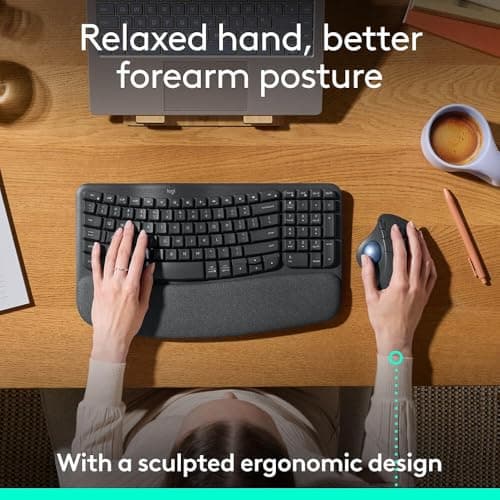
- Thumb-operated trackball — arm stays stationary, wrist stays neutral
- Dual wireless: Bluetooth + Logi Bolt USB receiver (up to 3 device memory)
- 3 customizable buttons with Smart Actions macro support
- Certified post-consumer recycled plastic construction
- AA battery — up to 20 months battery life claimed
- Smooth, precise 4000 DPI optical sensor for the trackball
- Works on any surface without a mouse pad
- Compatible with Windows, macOS, iPadOS, and Linux
Hands-On Review
I unboxed the M575S on a Tuesday morning and spent the first day genuinely frustrated. My muscle memory kept trying to pick the mouse up and move it — the same instinct I'd built over a decade of using traditional mice. By hour three, I switched back to my old mouse for a spreadsheet-heavy task because I couldn't get the cursor where I needed it fast enough.
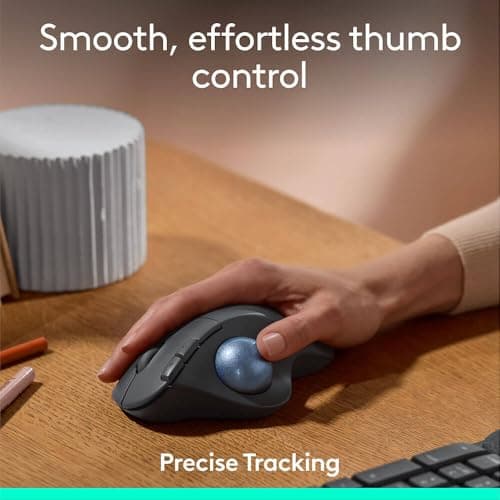
That resistance faded fast. By day three, something clicked. I stopped thinking about the cursor and started trusting my thumb. By the end of the first week, I'd naturally reverted to my old mouse twice — both times I picked up the M575S again within an hour because my wrist reminded me why I switched in the first place. There's a particular relief in feeling your forearm muscles actually relax mid-task, something I'd stopped noticing was missing until it came back.
The Smart Actions feature surprised me. I set up a two-button macro that opens my browser, navigates to my daily task board, and opens a new tab for my email — one press replaces what used to be seven keystrokes. It sounds small, but over a full workday it adds up. The Logi Options+ software is clean and intuitive, and I had the whole setup done in under ten minutes.
Battery life held up exactly as advertised through two weeks of moderate use. My OS battery indicator hasn't dipped below full. The scroll wheel, though — that's the one compromise I'm still adjusting to. It's smaller than a standard mouse scroll wheel, which makes long-document scrolling feel slightly more deliberate than I'd like. For casual browsing it's fine. For editing long articles or spreadsheets, I'd prefer a full-size wheel.
Who Should Buy It?
- Remote workers and hybrid employees who log 6+ hours daily at a desk and notice wrist, forearm, or shoulder tension by end of day.
- People with small or cluttered workspaces — the trackball's stationary design means you don't need room to move a mouse across a pad.
- Anyone recovering from or managing repetitive strain — carpal tunnel, tendinitis, or general RSI complaints where reducing wrist motion helps.
- Users who switch between multiple devices — the three-device Bluetooth memory lets you toggle between a laptop, desktop, and tablet without re-pairing.
Skip this if: you do fast-paced gaming or need pixel-perfect precision for graphic design — a standard high-DPI mouse with a pad still wins on raw responsiveness. Also skip if you have very small hands and struggle with thumb-reach ergonomics; try to get hands-on with one first.
Alternatives Worth Considering
Logitech MX Ergo — A higher-tier trackball with a tilt mechanism that lets you adjust the angle of the mouse body. Better build quality and a dual-trackball option (left and right thumb ball), but it costs nearly double and is heavier. Worth it only if the M575S ergonomics don't quite fit your hand angle.
Kensington Expert Wireless Trackball — A classic four-button trackball with a larger ball and a scroll ring around it. Excellent for power users who need lots of programmable buttons. The design is less modern and the USB receiver is older, but the functionality is rock-solid.
Logitech MX Master 3S — If you're committed to a traditional mouse form factor but want ergonomic benefits, the MX Master 3S has Logitech's best-in-class scroll wheel, a thumb rest, and software features comparable to the M575S. It's $30-40 more, but many users find it easier to transition to than a trackball.
FAQ
Yes — the core design philosophy eliminates the forearm pronation and wrist extension that aggravate carpal tunnel and general wrist strain. By keeping your arm stationary and using your thumb to move the cursor, you significantly reduce the repetitive micro-movements that cause pain over time.
Final Verdict
The Logitech Ergo M575S won't win over everyone on day one — the learning curve is a real barrier, and if you're coming from a high-end gaming mouse you'll notice the difference in responsiveness. But for the vast majority of desk workers who just want to get through a full day without wrist pain flaring up, this trackball delivers on its core promise. Your arm stays still, your wrist stays neutral, and after a week or two your thumb figures out the rest. Logitech's build quality and software support are rock solid, battery life is exceptional, and the Smart Actions feature adds genuine daily productivity value. At under $80, it's one of the most cost-effective ergonomic upgrades you can make to your workstation.