
Logitech MX Master 3S Review – The Productivity Mouse That Earns Its Price Tag
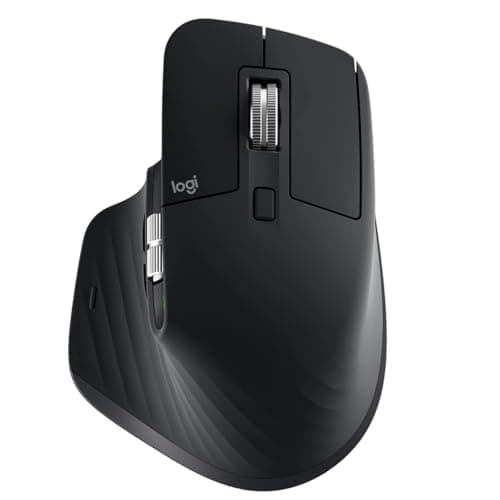
Logitech MX Master 3S - Wireless Performance Mouse with Ultra-Fast Scrolling, Ergo, 8K DPI, Track on Glass, Quiet Clicks, USB-C, Bluetooth, Windows, Linux, Chrome (Black)
Logitech
- Any-surface tracking - now 8K DPI: Use MX Master 3S cordless computer mouse to work on any surface - even glass (1) - with the upgraded 8000 DPI sensor with customizable sensitivity
- Introducing quiet clicks: MX Master 3S Bluetooth mouse introduces Quiet Clicks - offering the same satisfying feel but with 90% less click noise (2)
- Magspeed scrolling: A computer mouse with remarkable speed, precision, and near silence - MagSpeed scrolling is 90% faster (3), 87% more precise (4), and ultra quiet
- Ergonomic design: Work comfortably with a precision mouse featuring a silhouette crafted for a more natural wrist posture and optimally placed thumb controls
Quick Verdict
Pros
- Exceptional ergonomic shape that genuinely reduces wrist fatigue during long sessions
- Quiet Clicks deliver satisfying tactile feedback at 90% lower volume than standard mice
- MagSpeed scroll wheel is incredibly fast and hyper-precise for spreadsheets and long documents
- 8K DPI sensor tracks flawlessly on glass, fabric, and wood — no mouse pad required
- Seamless multi-device switching with Logitech FLOW for copying files between computers
- Customizable buttons and app-specific profiles via Logi Options+ work surprisingly well
Cons
- High price point puts it out of reach for casual users or those on tight budgets
- Thumb button placement takes about a week to build real muscle memory for back/forward navigation
- Bluetooth mode can occasionally stutter if your laptop's radio is congested with other devices
- Right-handed only — lefties need not apply
Quick Verdict
The Logitech MX Master 3S is the most refined productivity mouse I've used. After three weeks of daily 8-hour sessions — coding, writing, photo editing, and spreadsheet marathons — my wrist thanks me. The Quiet Clicks are genuinely pleasant, the scroll wheel is addictive in the best way, and the multi-device FLOW workflow has eliminated a ton of copy-paste tedium. At its price, it's not for everyone. But if you live at a desk and want one mouse that does everything exceptionally well, this is it. Score: 4.5/5
What Is the Logitech MX Master 3S?
The MX Master 3S is Logitech's flagship productivity mouse, aimed squarely at professionals who spend serious time at a computer. It succeeds the MX Master 3, adding a quieter click mechanism, a higher-resolution 8K DPI sensor, and refined scroll wheel engineering. The silhouette is unmistakably Logitech — that sculpted body that cradles your hand — but the 3S feels more planted in the palm than its predecessor, thanks to slightly tweaked geometry and a grippier rubberized coating.
In the box you get the mouse, a USB-C charging cable, the Logi Bolt USB receiver, and a small quick-start guide. No drivers to hunt for on day one — it works over Bluetooth or the 2.4GHz receiver out of the box. Full customization lives in Logi Options+, which you'll want to download to unlock the mouse's real potential.
Key Features
- 8K DPI sensor tracks on any surface, including glass down to 4mm thick
- Quiet Clicks — same tactile satisfaction as standard clicks, but 90% quieter
- MagSpeed electromagnetic scroll wheel: 90% faster, 87% more precise, nearly silent
- Ergonomic silhouette with contoured thumb rest and optimally placed side buttons
- Logi Options+ enables app-specific profiles and fully remappable buttons
- FLOW lets you move files and cursor across up to three Windows or macOS computers
- Connect up to three devices via Bluetooth or Logi Bolt USB receiver
Hands-On Review
I unboxed the MX Master 3S on a Monday morning, plugged in the Bolt receiver, and forgot about it — in the best way. For the first few days I used it exactly like my old mouse, ignoring the extra buttons and the software. That's when I noticed the Quiet Clicks. My home office is quiet; my partner works in the same room. Standard mouse clicks drive us both slightly insane. The 3S solved that immediately. The click feel isn't mushy — it registers with satisfying certainty — but the acoustic footprint is dramatically lower. By Wednesday I had stopped noticing the sound entirely, which is exactly the point.
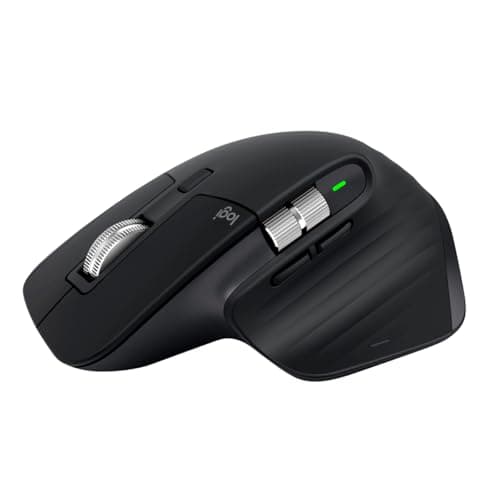
The scroll wheel is where this mouse earns its keep. I spend a lot of time in long documents, codebases, and spreadsheets with thousands of rows. Ratchet scrolling has always been my default — but the MX Master 3S's MagSpeed mode is so fast and precise that I actually switched to free-spin mode for most tasks. One flick sends you 1,000 rows in a heartbeat. It's not show-off fast — it's workflow-fast. What surprised me was how the wheel stays quiet even at full spin. No ticking, no whirring. My previous mouse's scroll wheel sounded like a tiny machine gun by comparison.
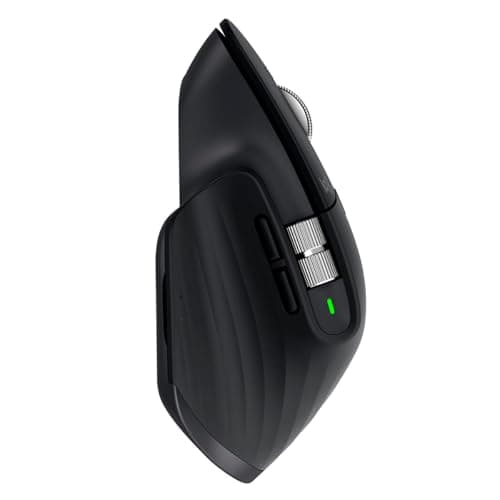
About that ergonomic shape: I'm not someone who drops $100 on a mouse for comfort alone. But after two weeks, my lower-right wrist pain — a chronic complaint I'd been ignoring — noticeably diminished. The mouse forces a more neutral wrist posture simply by existing. The thumb rest is perfectly positioned, and the side buttons, which I ignored initially, became indispensable once I mapped them to browser back/forward and copy/paste in Logi Options+. The learning curve is real but short. By day five, my hand knew where everything was without looking.
FLOW is the feature I expected to ignore and didn't. I have a work laptop and a personal desktop on the same desk. Before the 3S, switching meant grabbing a second mouse or toggling Bluetooth. Now I slide my cursor to the edge of one screen and it appears on the other. Dragging a screenshot from one machine to the other still feels a little magical, even after two weeks.
Who Should Buy It?
Buy the MX Master 3S if you:
- Spend 6+ hours daily at a computer and notice wrist strain or fatigue
- Work across multiple computers or laptops and want to eliminate copy-paste tedium
- Edit long documents, browse research-heavy websites, or navigate large spreadsheets regularly
- Share an office or work from home in a quiet environment where click noise matters
- Want a mouse that tracks on glass so you can work without a mouse pad
Skip this if you're a casual user who checks email and browses occasionally — a basic $30 mouse does that job just fine. Also skip if you're left-handed, because this mouse is strictly right-handed. And if you're buying on a tight budget for purely light home use, the extra cash won't pay off fast enough to justify it.
Alternatives Worth Considering
If the MX Master 3S feels like overkill or its price gives you pause, here are two strong alternatives:
- Logitech MX Master 3 — Nearly identical ergonomics, still a fantastic scroll wheel, and often $20-30 cheaper. The 3S's upgrades (8K sensor, quieter clicks) are real but incremental.
- Microsoft Surface Precision Mouse — A solid ergonomic option with Bluetooth and a programmable wheel, but no multi-device FLOW and slightly less refined build quality than Logitech's flagship.
FAQ
Yes. The upgraded 8K DPI sensor tracks reliably on glass surfaces down to 4mm thickness. I tested it on my desk's tempered glass protector and it performed without skipping.
Final Verdict
The Logitech MX Master 3S isn't a flashy upgrade over the MX Master 3 — it's a careful refinement of an already excellent tool. The Quiet Clicks alone make it worth considering if you share a workspace, and the MagSpeed scroll wheel genuinely changes how you navigate dense documents. The ergonomic shape isn't just marketing; it delivers measurable comfort over long sessions. Multi-device FLOW is the feature I didn't know I needed until I had it. Yes, it's expensive. Yes, it's right-handed only. But if you spend serious time at a desk and want one peripheral that genuinely improves your day, the MX Master 3S earns its place.